

This article is republished with permission from Wonder Tools, a newsletter that helps you discover the most useful sites and apps.
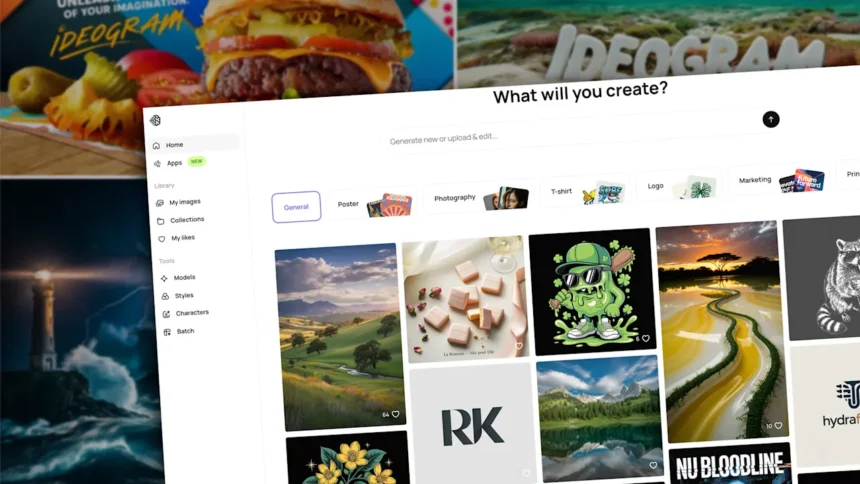
I rely on Ideogram, an AI image generator, to help me create posters, banners, social posts, newsletter illustrations, and video thumbnails.
Context: Ideogram competes in an exploding market. Gemini’s new Nano Banana Pro makes remarkable infographics, ChatGPT’s image generator produces fantastic illustrations, and Canva, Adobe, and Midjourney keep getting stronger. Yet I still find myself returning often to Ideogram.
10 reasons I like Ideogram
Your prompt gets automatically improved. Ideogram’s magic prompt algorithm refines your initial query. You can then approve it or revise.
Choose from four options. Each time you submit a prompt, you get back four generated images. Getting to choose one gives you a bit of editorial input.
Public image galleries are helpful for inspiration. Build on others’ prompts. Browse images of all shapes & styles, and top-ranked images, for ideas.
Get accurate text within images. Ideogram generates accurate text for social media graphics, thumbnails, banners, and logos. Ideogram’s guidance on text & typography includes excellent examples of prompts and text designs.
Pick from a variety of styles. Choose from dozens of styles, from Pop Art and Watercolor to Doodle, Travel Poster, and Surreal Collage. I often choose “auto” because I can’t make up my mind. I tend to opt for a clean, modern look for a presentation image, or a more abstract, artsy vibe for creative projects.
Use negative prompts. Paid subscribers can list specific elements NOT to be included in an image. That can be helpful if a particular detail could prevent your image from being usable.
Choose your image orientation. You can generate horizontal, vertical, or square images. Free users have 11 orientation options. That’s helpful for generating images that will fit your slide, podcast, newsletter, ad banner, site header, or whatever else. Paid subscribers get additional dimension choices.
Remix anything. Modify images you or others have generated with Ideogram’s remix button. I often tweak what I’ve generated to get closer to what I want. Be specific with your remix query: “dog” may yield a golden retriever instead of the poodle you envisioned.
Extend images. Ideogram’s Canvas feature lets paid users edit, extend, or combine images. Here’s a 45-second video with examples.
Create custom styles of your own Upload or pick a few images to generate a new style you can use repeatedly for a consistent look.
How to start using Ideogram
Visit Ideogram.ai and sign up for free with your Google, Apple or Microsoft account.
Check the welcome guide for starting tips, examples, and sample prompts.
Explore the public gallery to see others’ images and the prompts they used.
Describe an image you envision in a few sentences. Don’t worry about precise wording. You can opt to let Ideogram refine your prompt.
Choose a style. Decide if you want an illustrated or photographic-style image. Or pick ‘auto’ to let the algorithm decide. You can also select a color palette.
Choose dimensions. Pick a wide, vertical or square image. I mostly generate wide images, which match the width of presentations or web pages.
Click generate. On a free account, you can generate a limited number of images per day.
Wait a minute. The service slows free requests to incentivize upgrades.
Download the image you like and use it any way you choose.
Pricing
Free for a limited number of image generation credits each day. Depending on traffic to Ideogram, you can expect at least five free images a day. I started on the free plan but now pay for the service
$7/month billed annually for more images, quicker rendering, and advanced features like Canvas, which lets you modify & extend images.
Ideogram caveats
Limited free images. I often have to iterate on a prompt several times before getting something usable. On a free plan that may mean getting only one or two quality images a day.
Reduced image quality on downloads. Free users can only download a 70% quality JPEG image, not the full-resolution version.
Public image creation only. All images created on the free plan are public, meaning others can view and remix them.
Alternatives
Gemini Nano Banana Pro: Google recently launched its best image generator with a surprising name and remarkable versatility. You can use Nano Banana Pro for nearly any kind of visual — from a logo, infographic, or slide design, to an edited self-portrait based on your photo or an abstract image of a dog.
ChatGPT’s Image Generator: ChatGPT’s built-in AI image generation tool is excellent, particularly for generating cartoons, simple diagrams, or abstract illustrations. You can’t specify the dimensions of an image, but you can use an extended chat to provide context and guidance, and you can ask the AI assistant to iterate on the image result if it doesn’t satisfy you with its first attempts. You can also select an area of a generated image and prompt it to change that part.
Flux: Black Forest Labs, which makes the Flux 2 AI image generator, recently raised $300 million from investors. Flux images are dramatic and distinct. You can create 50 images for free after signing into the Flux Playground, or you can use the model on Hugging Face. Flux doesn’t require any special prompting lingo. I find Ideogram simpler to use, and it has a broader set of features, but Flux is excellent at generating accurate text inside images, and it’s a powerful tool on the rise. Here are Flux versions of the Ideogram image I created at the top of this post.
Adobe Firefly: Adobe has a growing suite of AI tools that keep getting better. Firefly has some unique capabilities. You can customize your image’s camera angle, lighting, color, tone and special effects, among other advanced features. Adobe has also committed to respecting creators by not training on their content without express permission.
Concerns about AI image generation
Less control. With editing tools like Photoshop, Illustrator, Figma, and Canva, you have full control over the pixels you’re designing. When you generate images with AI, you have less say over a visual’s specifics.
Risk of confusion. Some AI-generated images look like real people, objects, or buildings, which can be misleading if not explained. An AI-generated photo of a person in an office might be assumed to be a real employee.
Displacement of artists. Talented professionals may see diminishing demand for their services as people increasingly look to AI services instead of hiring creatives. And lawsuits allege that AI models were unfairly trained on human work. Getty recently lost one such suit, but others are ongoing.
The rise of AI sludge. With AI image generation spreading, it’s easier than ever to mass produce visual images without thought. It is also easier to imitate anyone’s visual style, so AI-powered copycats may proliferate.
Error prone. Some AI generation tools still can’t reliably reproduce text well. Words within images may be garbled, like this mangled poster made by DALL-E in 2024.
This article is republished with permission from Wonder Tools, a newsletter that helps you discover the most useful sites and apps.